
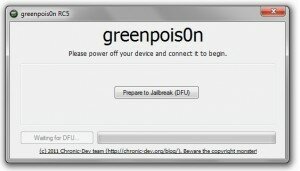
 The greenpois0n RC 5.2 untethered download for Windows has now been released by the Chronic Dev Team. You can download greenpois0n Windows RC 5.2 from the greenpois0n page. This version is compatible with the following devices on iOS 4.2.1:
- iPhone 4 – 4.2.1
- iPhone 3GS – 4.2.1
- iPod touch 4G – 4.2.1
- iPod touch 3G – 4.2.1
- iPod touch 2G – 4.2.1
- iPad 1G – 4.2.1
- Apple TV – 4.2.1
Please subscribe to our YouTube, follow us on Twitter, and fan us on Facebook for future updates! Also scroll up to the top of this post and click the Facebook like button if you find this post helpful.
Jailbreak iOS 4.2.1 Untethered with Greenpois0n Windows RC 5.2 Tutorial
1. Download greenpois0n for Windows, then watch this video or follow the instructions below.
2. Make sure you are using the latest version of iTunes (currently that is version 10.1.2) otherwise you won’t be able to do a 4.2.1 untethered jailbreak. To do that go to iTunes – > Check for Updates.
3. Connect your iOS 4.2.1 device to your computer using the white USB cable.
4. If iTunes opens, make sure you close it!
5. Open the greenpois0n Windows RC 5.2 application to begin the jailbreak iOS 4.2.1 untethered process.
6. Follow the instructions within greenpois0n Windows RC 5.2 so you can get an untethered iOS 4.2.1 jailbreak, first click the “Prepare to Jailbreak (DFU)” button:
- Press and hold the sleep button (2 seconds)
- Continue holding sleep; press and hold home button (10 seconds)
- Release sleep button; continue holding home button (15 seconds)
7. After following step 6, your device will be in DFU mode and greenpois0n will start jailbreaking iOS 4.2.1 untethered on your device.
8. Once your device is successfully jailbroken untethered on your iOS 4.2.1 software, then your device will reboot and you will see a green icon named “Loader” on your device.
9. Tap on the green “Loader” application to open it, and then tap on Cydia and tap on “Install” to install Cydia. Now Cydia should be on your iOS 4.2.1 jailbroken untethered device, and you should be able to install jailbroken apps on it.
Troubleshooting
- Cydia does not show up on my iOS 4.2.1 untethered jailbreak device after using Loader? – Try rebooting your device and seeing if it shows up. I had to restart my iPhone 4 and it showed up after rebooting.
- greenpois0n is stuck on greenpois0n initialized and has the following error message:
-
- unable to find gBdevList
-
- unable to find fs_mount
-
- unable to find fs_unmount
-
- unable to find fs_load_file
- The above problem did not occur on my device. If anyone had this problem, please be sure to share how you fixed it in the comments so other people can fix this problem if they come across it as well. UPDATE: Greenpois0n RC 5.2 is released, and should fix this problem.
-
- greenpois0n 1.0 RC 5 Quit Unexpectedly – Just relaunch it and try it again!
- Loader is not installing Cydia – Due to many other users like you, the server which hosts the Cydia download is overloaded. I recommend trying downloading some other time, or you can just use redsn0w 0.9.6 rc8 and install Cydia through that. It’s very easy to use redsn0w and install it and that’s what other people seem to be doing too right now.
How did greenpois0n Windows RC5.2 work for you? Were you able to successfully untethered jailbreak iOS 4.2.1 on your device? Let us know in the comments below.